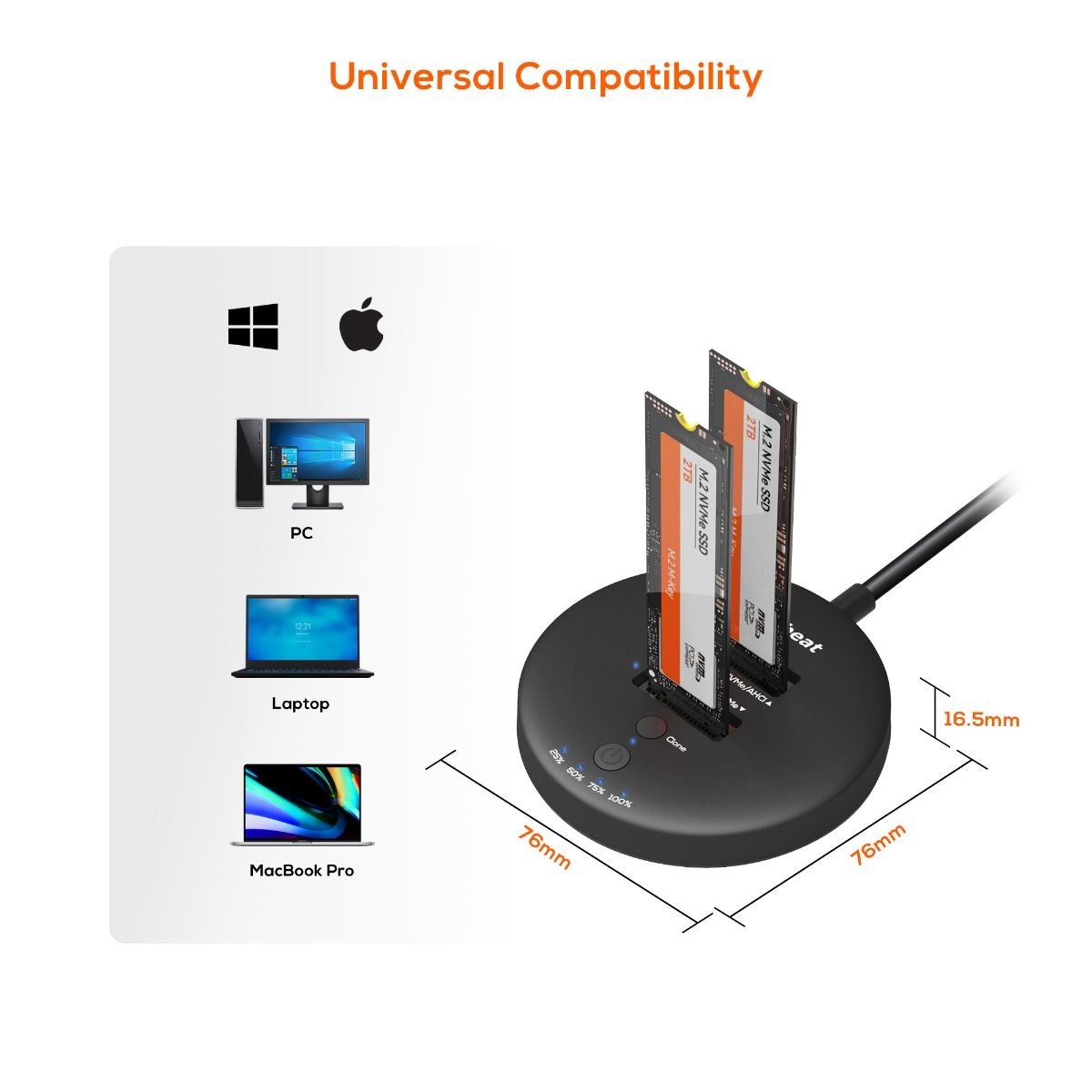
mbeat H3 USB 3.2 Gen2x2 20Gbps Dual M.2 NVMe SSD Dock with Clone Duplicator

mbeat H3 dual M.2 NVMe SSD dock front view
$134.95

Description:

The mbeat H3 dual M.2 SSD dock with clone duplicator delivers offline cloning at up to 20Gbps — no PC or software required. Supports NVMe-to-NVMe and AHCI-to-NVMe cloning across all major M.2 form factors (2230 to 22110), with USB 3.2 Gen2x2 transfer speeds and plug-and-play compatibility on Windows and macOS.

Dual SSD Dock & Clone Duplicator: Seamlessly connect two M.2 SSDs for instant data transfer and duplication tasks.

Versatile Data Transfer: Effortlessly supports various transfer modes including NVMe to NVMe or AHCI to NVMe, with offline clone capability for enhanced flexibility.

Wide Compatibility: Compatible with AHCI SSDs and B+M & M Key NVMe SSDs, accommodating sizes ranging from 2230, 2240, 2260, 2280 and 22110 for comprehensive compatibility.

High-Speed Transfers: Utilises USB 3.2 Gen2 technology to ensure lightning-fast data transfers at speeds of up to 20Gbps, while built-in LED indicators provide quick status checks during clone operations.

Cross-Platform Compatibility: Designed to seamlessly work with both Windows and Mac OS systems, ensuring versatility and ease of use across different platforms. 

• USB Port: USB-C 3.2 Gen2 × 2

Data Speed: Max. 20Gbps for one SSD, 10Gbps per SSD for two.

USB Compatibility: Backward compatible with USB 3.1/3.0/2.0 standard

Controller IC: JMS586U

SSD Interface: Supports B+M & M Key NVMe SSD

Clone Speed: Up to 15Gbps maximum (SSD requires minimum 2000MB/s read and 1600MB/s write)

Supports SSD Size: M.2 SSD 2230/2242/2260/2280/22110

Supports OS: Windows 2000/2003/XP/Vista/7/8/8.1/10/11 and MAC OS • DC Power: Include +5V/3A Power supply

Cable Length: Built-in 25cm cable

Product Dimension (with Cable): 332mm × 76mm × 16.3mm

Product Weight (with Cable): 96g

Package Contents: Dual M.2 SSD Dock, DC Power Supply, User Manual

Frequently Asked Questions — MB-HDD-M2H3CL

Q1: What is the difference between the mbeat H3 and H1 M.2 SSD docks?

The mbeat H1 and H3 are both M.2 NVMe SSD docks, but they serve different use cases. The H3 is a dual-slot dock with USB 3.2 Gen2x2 (20Gbps) and built-in offline clone / duplicator capability — letting you copy one M.2 SSD to another without a PC. The H1 is a compact single-slot mini dock running at 10Gbps, suited for straightforward portable SSD access rather than cloning or backup workflows.

Featurembeat H3 (MB-HDD-M2H3CL)mbeat H1 (MB-HDD-M2H1)
SSD Slots 2 (dual) 1 (single)
Max Transfer Speed 20Gbps (one SSD) / 10Gbps each (two SSDs) 10Gbps
Offline Clone Yes — no PC required No
Interface USB-C 3.2 Gen2x2 USB-C 3.2 Gen2
Best For Cloning, upgrading, backup, IT workflows Portable single-SSD access

Q2: How does the offline clone function work? Do I need a PC?

No PC is required. Insert the source SSD into Slot 1 and the destination SSD into Slot 2, then press and hold the clone button on the dock. The H3 will begin duplicating the source drive directly to the destination drive, with LED indicators showing progress. This makes it ideal for upgrading a laptop SSD, creating a bootable backup, or preparing drives for deployment in an IT environment — all without opening a laptop or launching any software.

⚠️ Clone Speed Note: Maximum clone speed is up to 15Gbps. For best results, both SSDs should meet a minimum of 2000MB/s read and 1600MB/s write. Slower drives will clone at the speed of the slower drive.

Q3: Can I clone to a larger SSD? What if the destination drive is bigger than the source?

Yes. The H3 supports cloning from a smaller source SSD to a larger destination SSD — the most common upgrade scenario (for example, cloning a 512GB drive to a 1TB or 2TB drive). The clone operation copies the partition layout and all data from the source; the extra unallocated space on the destination can be expanded afterwards using Disk Management (Windows) or Disk Utility (macOS).

⚠️ Important: Cloning from a larger source to a smaller destination is only possible if the actual used data fits within the destination’s capacity. The H3 does not perform smart partition resizing — ensure the destination drive has sufficient space before proceeding.

Q4: Which M.2 SSD types and form factors are compatible with the MB-HDD-M2H3CL?

The H3 supports both NVMe (PCIe) and AHCI (SATA-based) M.2 SSDs across a wide range of physical sizes. It also supports cross-protocol cloning — for example, duplicating from an older AHCI SSD to a faster NVMe drive when upgrading storage.

SpecificationSupported
SSD Protocols NVMe (PCIe) and AHCI (SATA)
Key Types M Key and B+M Key
Form Factors 2230 / 2242 / 2260 / 2280 / 22110
Clone Modes NVMe to NVMe, AHCI to NVMe, AHCI to AHCI

⚠️ Note: The H3 does not support standard 2.5″ SATA HDDs or SSDs. M.2 form factor only.

Q5: What are the actual transfer speeds when using one SSD versus two SSDs simultaneously?

The H3 uses a JMS586U controller with a USB-C 3.2 Gen2x2 interface delivering a combined 20Gbps bandwidth. When a single SSD is installed, the full 20Gbps is available to that drive. When two SSDs are used simultaneously, the bandwidth is shared at 10Gbps per slot. For clone operations, the dock manages the internal read/write independently at up to 15Gbps.

Usage ModeAvailable Bandwidth
Single SSD (Slot 1 or Slot 2) Up to 20Gbps
Dual SSD (both slots active) 10Gbps per SSD
Offline Clone Mode Up to 15Gbps (SSD performance dependent)

Q6: Is a driver required? Does it work with both Windows and macOS?

No driver installation is required. The H3 is plug-and-play on both Windows and macOS — connect via the built-in USB-C cable and your operating system will recognise the SSD(s) automatically. The offline clone function operates entirely on the dock hardware with no software or OS involvement.

Operating SystemSupported Versions
Windows 2000 / 2003 / XP / Vista / 7 / 8 / 8.1 / 10 / 11
macOS Mac OS X and above (plug-and-play, no driver required)

⚠️ Host Port Requirement: Your laptop or PC must support USB 3.2 Gen2x2 to achieve the full 20Gbps transfer speed. The dock is backward compatible with USB 3.1 / 3.0 / 2.0, but speeds will be limited to the host port’s capability.

Q7: What is included in the box?

ItemDetails
Dual M.2 SSD Dock mbeat H3 with built-in 25cm USB-C cable
DC Power Supply +5V / 3A adapter (included)
User Manual Printed quick-start guide